Step by Step Connect Samsung Android to Computer

January 27th, 2013 by admin No comments »

There are several ways to connect Samsung  Android to computer as described on the website of Samsung. That’s how easiest connect Samsung phone to Computer. Actually before I know how I almost gave up and resigned to not being able to connect the phone with the computer. Accidentally when the mean charging via computer , phone had been connected. 

How to connect device to pc is to make us as a Mass Storage , do as follows:

On PC : Open this kies software that have been installed on computer :

kies

On Phone :

1. First , make sure USB Debugging Check In, do I go to Settings -> Applications -> Development and check USB debugging as shown below
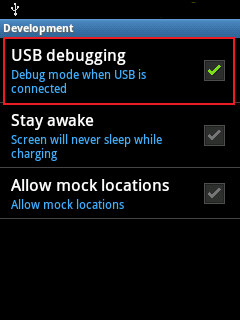
USB Debugging

2.  Connect the Samsung to a computer using a USB cable then USB symbol will appear in the upper left corner the phone.

3. Drag or flick down the status bar will display as shown below.
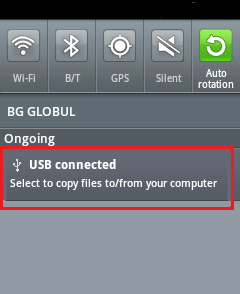
Usb Connect

4. Tap or click on the "USB Connected", wait a while then it will appear as shown below
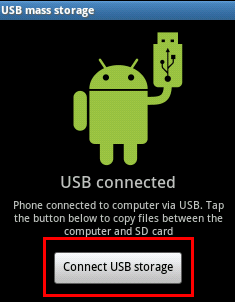
Koneksi samsung Y

5. Tap on "Connect USB storage"

6. If it says "Connecting USB storage will stop …." select OK, wait a while until connected.

7. If it it says "Disconnect USB storage" means  Samsung  you are have been connected to a computer, now just open the file in your phone through computer  as removable disks like open a file at regular USB.

8. To disconnect you can click "Disconnect USB Storage" then stop the USB connection on your computer as normal USB.

Want to Block Some Number from Calls and Sms on Samsung Wave 2 S8530

January 25th, 2013 by admin No comments »

Ask from : Robin < Ko***@ gmail. com>. Ask topic :  Call and SMS blocker for Samsung Wave 2 S8530 .

Answer : Yes you can , Robin, I’m also say thanks for your asked. Your phone Bada OS smartphone thank I think that the blocking feature is not available on your Samsung Wave 2 phone, either thru built-in features or from software/apps. You can, however, screen your unwanted calls/sms. Your screened calls will not ring on your phone.

Here is the step by step To do this:

From your phone go into Menu -> Settings -> Call Settings -> No. Screening -> Options -> Add to add the unwanted number. You can also retrieve the number to screen by going to: Menu -> Call Register -> Received Calls -> Options -> Add to screen. list.

Original Ask Submitted on 2013/01/22 at 4:23 pm

Hi There, Can I ask you something? I have Samsung Wave 2 S8530 i wanted to block one particular number from calls and sms? thanks

best regards

Install flash player on my Garmin A 50 Asus

January 24th, 2013 by admin No comments »

From: Mohamed D. <we** @ hotmail.fr>  Subject: How to Install flash player on my Asus Garmin A 50 .

Answer : Hi Mohammed D. Please Try here..Click you get your flash player for Android :
https://sites.google.com/site/androidcampus911/flash_player10.1armv6android.apk?attredirects=1
After downloading it,open it and install it. Really in less than 3 minutes.
or find here :
Flash Player App has been ported for ARMv6 based devices. It has been tested on Galaxy 5 and it works!

FLASH PLAYER ARM 6

or here

CLICK TO DOWNLOAD 

Instructions:
1. Download and copy to sdcard.
2. Use a file manager and navigate to the apk, install it.
3. Reboot the phone and all done .
additional notes:
* make sure to have "unknown sources" enabled on settings > applications.
* it won’t work on opera mini.
* works with both froyo and gingerbread (confirmed).
* works best with dolphin browser hd


Sent: Sunday, January 20, 2013 6:59 PM

Hello,
I found the page because i was looking for how to install flash player on my Garmin A 50 Asus
but the link on your site isn’t working. i hope i can get a good one from you …
Thanks